Pages

Wednesday, 18 February 2015

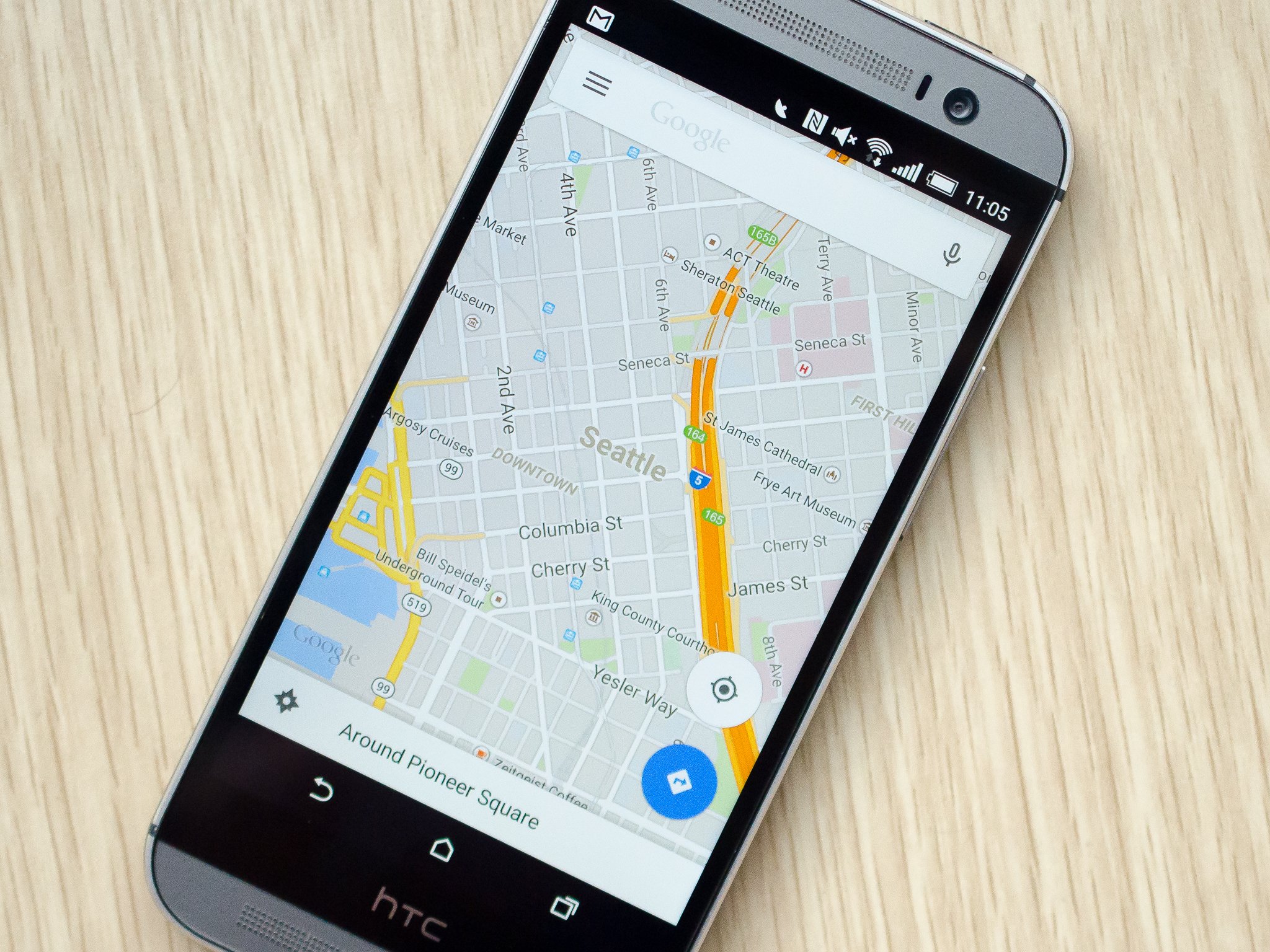
How to share directions in Google Maps for Android

You've always been able to share a specific location, or even your own location, on Google Maps — but as of version 9.3 of the app you can now share point to point directions.

Google Maps

Google Maps The process is extremely simple, and gives you step-by-step text directions that can be read by anyone on any device, whether they use Google Maps or not. And though most folks with smartphones sharing location information to another smartphone user will be better off sharing a proper Maps location, this is how you can share basic directions — read along.
In order to share step-by-step directions from one place to another, simply put the start and end points into the Google Maps app, choose a mode of transportation and a route, and then instead of hitting the navigation button press the menu button (top right corner). Now behind the button along with the toggles for traffic, you'll see an option for Share directions.

Tap the Share directions button and you'll be able to share out the list of directions to any app that can handle text. For example you may want to send the direction list to Gmail, Evernote or maybe just your SMS app of choice. Choose the app you want to send to, and the app will take in a numbered list of directions showing the start and end points you selected, the travel time and distance, followed by the steps and a goo.gl short link to the directions on the web.

For most folks it'll still be easier to share a location to someone and have them navigate from a specific point they want, but if you need basic step-by-step directions from pre-determined points the latest version of Maps has you covered.

The basics of Google Maps

Using Google Maps offline
Google Maps
Share directions in Google Maps

Download: Google Maps on Google Play
Get it on Google Play

Verizon Wireless swaps CEOS, John Stratton now in charge

Verizon Wireless

Big Red has a new chief, with John Stratton replacing Dan Mead as CEO of Verizon Wireless. Stratton comes from within Verizon, having previously served as the company's President of Global Enterprise and Consumer Wireline. Mead will stay with Verizon to oversee the sale of the company's wireline assets, and then plans to retire. Verizon Wireless is still a subsidiary of Verizon Communications, so Stratton will report to the parent company's CEO Lowell McAdam.

Mead held the role of Verizon Wireless CEO starting in 2010, making him the longest-tenured active CEO of the major carriers in the US. Outspoken T-Mobile CEO John Legere now takes that position, having taken leadership of his carrier in 2012.

Source: SEC; Via: FierceWireless

These are the Android devices that support Qualcomm's Quick Charge 2.0

We're still in the early days of Qualcomm's Quick Charge 2.0 technology, which gives an extra boost of charging on the front end and then slows things down to finish the job.

  But already we've got a number of Android smartphones and even a couple tablets that support the new technology. This is going to be a big deal in 2015, especially as there are so many phones that don't have removable batteries. And it's an even bigger deal in the car, as a 20-minute drive can mean you get a lot more juice in the same amount of time.

And the list of phones that support Qualcomm's Quick Charge standard are growing. A number of devices released in 2014 already support it, and we'll see even more as new devices are released in 2015.

We'll keep this list updated as more are announced. But here, now, are the phones and tablets that are supported by Qualcomm Quick Charge 2.0:

U.S.-specific devices

HTC Desire EYE
HTC One M8
HTC One Remix (Verizon Mini 2)
Moto X 2014
Motorola Droid Turbo
Nexus 6
Samsung Galaxy Note Edge
Samsung Galaxy Note 4
Sony Xperia Z2 Tablet
Sony Xperia Z3
Sony Xperia Z3 Compact
Sony Xperia Z3 Tablet Compact
Fujitsu Arrows NX
HTC Butterfly 2
Kyocera URBANO L03
Moto Maxx
Panasonic CM-1
Samsung GALAXY S4 (Japan)
Sharp AQUOS Pad
Sharp Aquos Tab
Sharp AQUOS Zeta
Sony Xperia Z2 (Japan)
Xiaomi Mi3
Xiaomi Mi4
YOTAPHONE 2
Xiaomi Mi Note

Yahoo’s Aviate Launcher updated with new Search functionality

Yahoo Aviate Launcher

Yahoo has just pushed out a new update to their Aviate Launcher that adds a pretty convenient feature to the app. The feature is called Search on Aviate, and it lets you search for apps, contacts and web search results directly from your home screen. Prior to the update, searching for web results would force you to open a browser or head to the Yahoo app to get some answers. Now the information can be accessed right on your home screen via a search box, similar to the Google Search bar that comes stock on Android devices. To get the most recent update, you must be running Android 4.0 or higher for the Search box to appear on your home screen.

yahoo aviate launcher

Search on Aviate is now available in over 70 markets where Yahoo Search is available. Additionally, the Aviate team has thrown in some bug fixes with the update, so the app should run a bit smoother than before. We’re sure Aviate users around the world will welcome these changes. If you have yet to grab the update, head to the Google Play Store link below.

Get it on Google Play

HTC anticipates the arrival of Lollipop update for the Verizon One M8 in early March

Just a few weeks ago, HTC announced that the update to Lollipop wouldn’t make its way to most One M7 and M8 owners within the company’s 90-day guarantee. Even though HTC had good reason to delay the update, this still discouraged many users hoping to try out the latest and greatest software in a timely fashion. But that didn’t stop the company from rolling out the Lollipop update to multiple M8 handsets only days after that announcement. We’ve seen the T-Mobile, Unlocked, Developer Edition, GPe and certain European variants get the update, and now it will soon be Verizon’s turn.

Mo Versi, HTC‘s Product Manager, took to Twitter to respond to a user’s inquiry on the Verizon HTC One M8 Lollipop update. In response, Versi told the user that the Verizon M8 Lollipop update is “in the lab,” and that the company is expecting approval for the update in the first week of March. We don’t have an exact date as to when the update will roll out, but at least now we have a pretty reliable timeframe.

Verizon may not be the quickest carrier with software updates, and HTC may have missed their 90-day guarantee, but now we know the company is working hard on the update. If you have a Verizon HTC One M8, you may want to start checking for a software update in the coming weeks. Head to Settings>Software update>Check new.

HTC-Logo-3


VIA:PHANDROID
SOURCE:MO VERSI (TWITTER)

Facebook is working on VR apps

Facebook made it pretty clear that it had big plans for virtual reality when it purchased Oculus VR for $2 billion last year. Chris Cox, Chief Product Offer at Facebook, has announced that the company has begun working on apps for VR, but wouldn’t disclose exactly what was being worked on.

Despite a lack of fine details, Cox said that he envisioned apps that would allow users to share their current environment with other people, something that he believes could become the norm for social media in the future. Oculus and Samsung have already shown off some unique narrative VR experiences at the Sundance Film Festival this year, but developing this into a real-time experience is a bigger technological challenge. Furthermore, Facebook’s Mark Zuckerberg already announced plans to integrate Oculus’ VR technology into the core social experience, allowing users to share “entire experiences and adventures” together online.

However, when asked about how long it might be before we can try out Facebook’s virtual reality experiences, Cox replied that it would be “a while” yet. Not to mention that virtual reality handsets aren’t common pieces of technology available in everyone household yet either.

Do you see any potential in virtual reality based social media?

login-facebook

Newly announced BenQ F52 packs a Snapdragon 810 and 3GB RAM

benq-snapdragon810


BenQ is not a name that we think of when it comes to smartphones, and honestly the Taiwanese company isn’t even that well known of a brand when it comes to its primary market: monitors and accessories. That said, it seems that BenQ is hoping to change up its reputation a bit with the introduction of the BenQ F52.

This isn’t BenQ’s first rodeo when it comes to smartphones, though the majority of their devices have been pretty much on the low to mid-range side of the game. The F52 takes things much further upscale, offering up a Snapdragon 810 octa-core CPU with 3GB RAM. The display isn’t a QHD monster, but it is still a respectable 5.2-inch display with a resolution of 1080 x 1920 (424 ppi). While the full list of specifications have yet to be revealed, we can say that the phone is said to offer an 8MP front cam and a 13MP rear cam. It is also running Android 5.0 Lollipop, though it seems to have at least some OEM-specific tweaks and a bunch of apps from Cheetah Mobile, due to their partnership with the Chinese app developer.

Judging by BenQ’s past with their limited smartphone offerings, it is likely that the phone will largely be targeted at the Asian market. We expect to learn more about the device (and its price tag) at MWC 2015, where it will be formally outed alongside two new mid-range handsets, the B50 and B502.What do you think, if pricing is right and the phone arrived in your own regional backyard, would you consider giving BenQ’s F52 a chance?

VIA:PHONE ARENA
SOURCE:SOGI

It's Always Material-O'Clock With 'Bold Watch Face' For Android Wear


Material warriors, this is the watch face you've been waiting for. It's a watch face forged from the finest material pixels and animations, presumably with the blessing of Lord DuARTe himself. What time is it? Material-o'clock, now and forever.


Okay, but seriously, it's a digital watch face with some material effects. The central time readout is on a FAB-like circle with a shadow beneath. The background shows a slowly expanding material ripple animation that actually serves as a second hand of sorts. The colors of the foreground and background are also configurable in the phone app.


Bold Watch Face costs $1.29 and works on all Wear devices, but I feel like it makes the most sense on the Moto 360. The ambient mode displays the ripple in grey (not always great for AMOLED) and the round design doesn't seem fitting for square devices. That's just one nerd's opinion, though.


Developers in 12 new countries can now sell apps in the Google Play Store

Although Android app developers from all around the globe are able to upload their apps into the Google Play Store, less than half of those are actually able to charge for their apps, or collect in-app payments. Still below half, Google has increased the number of available paid app countries by 12, including Jamaica, Estonia and Panama.

The Google Play Store offers developers a few different account types that developers can apply for. The basic Developer Registration, as previously mentioned, is open to app creators in just over one hundred and fifty countries. This account type allows developers to upload free apps only, with no in-app purchases, leaving devs to find an income elsewhere for their hard work, usually with advertising.

Merchant Registration is where money comes into play. Devs must meet a specific list of Google account requirements, and their country of residence must have come to agreement with Google over taxes and such. Once all criteria is met, paid apps and in-app purchases are made available to the developer. This is the account type now open to a dozen new countries.

Google Play Store Logo

The list of countries whose residents can now apply for Merchant Registrations today adds the following:

Bahrain
Bolivia
Bulgaria
Cyprus
Dominican Republic
Estonia
Honduras
Jamaica
Latvia
Lithuania
Malta
Panama
In all, seventy four countries can now upload paid apps and apps with in-app payments into the Google Play Store. Luckily, the list of countries that can purchase said apps is much larger. But you likely already knew that.

Head on over to Google’s Supported locations page for developer accounts to see what you are allowed to develop in your country.

Do you think Google’s developer requirements are fair?

Google Play Store


Samsung announces faster eMMC 5.1 flash memory chips

Samsung 64GB eMMC memory

Today, Samsung announced its first flash memory chips based on the newly approved eMMC 5.1 standard. eMMC is an embedded version of the MultiMediaCard standard, which packages the NAND memory and controller into a single chip. This technology is found in all smartphones and tablets on the market today. Earlier this month, Samsung began mass producing the industry’s first combined DRAM and eMMC ePOP memory package.

Samsung states that its eMMC 5.1 chip will be available in 64GB, 32GB and 16GB densities, just like its existing eMMC 5.0 options. The 64GB eMMC 5.1 memory module features a maximum speed of 250 MB/s for sequential data reading and 125 MB/s for sequential writes. For comparison, eMMC 5.0 allows for reads at 250 MB/s and writes at 90 MB/s, so the writing speed has been improved. Furthermore, random read performance has been boosted from 7,000 IOPS to 11,000 IOPS and random write performance reaches 13,000 IOPS, up from 7,000 IOPS.

Samsung also boasts that its eMMC 5.1 chips will feature eMMC’s first command queue function, allowing for multiple commands to be queue up in advance rather than sending new commands only once the previous one has been completed. Samsung’s solution also includes “Secure Write Protection”, that ensures only designated users will be able to access secured areas of the memory.

Essentially, eMMC 5.1 provides slightly faster data transfer speeds and will smooth out performance in some situations on your mobile device, particularly when it comes to saving high definition video content and moving big chunks of data around.

VIA:ANANDTECH
SOURCE:SAMSUNG

Qualcomm announces four new mid-tier SoCs with high-end performance and features

Qualcomm has just announced four new SoCs in its mid-tier Snapdragon 600 and 400 ranges, which aim to bring high-end performance and functionality to lower cost products.

Cortex-A72 powered Snapdragon 618 & 620

We’ll start with the biggest news. The new Snapdragon 618 and 620 are the first SoC’s to use ARM’s latest Cortex-A72 CPU core. The Cortex-A72 offers up to 3.5 times the peak performance of the last generation Cortex-A15 CPU and a 50 percent performance boost over the Cortex-A53. The Cortex-A72’s performance is comparable to the high-end Cortex-A57, which is powering Qualcomm’s flagship Snapdragon 810, but the real aim is to lower power consumption.

The 618 and 620 will be built on a 28nm manufacturing process, so won’t see all of the performance and battery benefits touted during the announcement of ARM’s Cortex-A72. However, these new Snapdragon 600 series chips should still be able to close the gap on Qualcomm’s top-tier 20nm Snapdragon 810.

Cortex-A72-Highest-Perf-ARM-Cortex-Proc

The Snapdragon 618 will feature two Cortex-A72 cores paired with four energy efficient Cortex-A53 cores, configured in a big.LITTLE arrangement. The Snapdragon 620 features four Cortex-A72s and four Cortex-A53s, which could rival the Snapdragon 810 for peak performance. Qualcomm has not confirmed which GPUs it will be pairing up with the new SoC designs, other than that it will be using a “next-generation” Adreno GPU.

Qualcomm also announced additional features for these new 600 series Snapdragons. 4K video capture and playback support, including H.265 hardware decode, is taken from the 800 series and the SoCs come with Qualcomm’s X8 LTE modem, which offers up to 300Mbps download and 100Mbps upload speeds.

Octa-core Snapdragon 415 and 425

Moving on, the new 28nm Snapdragon 415 and 425 are Qualcomm’s latest low-end mobile processors, but the technology here is also receiving a major bump over the previous entries in the series. Qualcomm will be moving its new 400 series chips from four to eight cores. Both will come packing eight 64-bit Cortex-A53 CPU cores and Qualcomm’s in-house Adreno 405 GPU, much like the existing Snapdragon 615.

The Snapdragon 415 and 425 will also include features previously reserved for higher-end Snapdragon chips. These include, support for dual image sensors and two ISPs, Quick Charge 2.0 compatibility, and hardware decode support for 1080p H.264 video.

The major difference between these two 400 series chips comes down to LTE speeds. Both feature integrated LTE modems, but the 415 uses the X5 LTE module, which supports download and upload speeds of 150Mbps and 50Mbps respectively, while the Snapdragon 425 features the same X8 modem found in the new Snapdragon 618 and 620.

Qualcomm is also replacing the “Gobi” name on its modems with its more well-known “Snapdragon” branding. The infographic below shows where these renamed chips rank in terms of speed and in which SoCs you can expect to find them.

Qualcomm LTE Modems

The Snapdragon 415 is already available for sampling and should arrive in smartphones within the first half of this year, while the 425 should begin to appear in the second half of 2015. The Snapdragon 618 and 620 are also set to arrive in consumer devices sometime in H2 2015.

SOURCE:ARSTECHNICA

Tuesday, 17 February 2015

CuBox-i review – an elegant mini PC which runs Android, Linux and OpenELEC

8.1   The CuBox-i is certainly an interesting mini PC. It offers a lot of flexibility since its support for Android and Linux is excellent, and it excels at running Kodi.

The Bottom Line

PROS
  • Dual- or Quad-core processor
  • 1GB or 2GB memory
  • Excellent support for XBMC/Kodi
  • Also runs Android & Linux

CONS
  • Price


One of the most important commercial uses of a Single Board Computer (SBC) is as a prototyping and rapid development platform. Recently I reviewed the HummingBoard-i2eX, a SBC from SolidRun that is compatible with Android and Linux. Since the proof is in the pudding, SolidRun has used its own tech to create a truly miniature PC.

At just 2 inches x 2 inches x 2 inches (50.8 mm x 50.8 mm x 50.8 mm) the CuBox is a marvel of engineering. On one side of the cube is a set of ports including the power socket, HDMI, Ethernet and two USB ports. While the rest of the cube is fairly bland except for various labels, logos and LEDs.

CuBox-i-IMG_1227

To fully understand the innards of the CuBox-i you should check out the full review of the HummingBoard. But in short, both devices use Freescale’s i.MX 6 series of processors. The i.MX 6 range is based on ARM’s Cortex-A9 design, and scales from single- to quad-core.

I recently got my hands on a CuBox-i2eX from SolidRun. Let’s take a deeper look, shall we?

CUBOX-I SPECIFICATIONS

The CuBox-i comes in two variants, a dual-core version (CuBox-i2eX) and a quad-core version (CuBox-i4Pro). Other than the extra two cores, the i4Pro comes with 2GB of RAM (rather than 1GB) and Wi-Fi/Bluetooth are included by default (rather than being an option). My test unit is the dual-core version.

Here is a detailed look at the CuBox-i specs:

CuBox-i-IMG_1247 CuBox-i-IMG_1232 CuBox-i-IMG_1231 CuBox-i-IMG_1226
CuBox-i-IMG_1230 CuBox-i-IMG_1229 CuBox-i-IMG_1228 CuBox-i-IMG_1249

OPENELEC

One of the primary uses of the CuBox-i is as a media player. Since the cube supports Android and Linux then there are several different ways to achieve this. For example, you could use Android with an app like Netflix, or you can use Linux with a media player like Kodi (previously called XBMC).

SolidRun provides a couple of Linux distros that boots straight into Kodi. One is GeexBox XBMC, the other is OpenELEC (Open Embedded Linux Entertainment Center). OpenELEC is a small Linux distribution that turns the CuBox into a Kodi media center.

Cubox-i-openelec

In fact, you can order a micro SD card pre-loaded with OpenELEC when you buy the box. This makes using Kodi a breeze. Just boot up the CuBox and you are straight into the media player. I did a brief test by inserting a USB stick with some MP4 video files. The USB drive was recognized by the CuBox without any problems. I was able to navigate to the files from within Kodi and play the videos. The playback was smooth, and the sound goes through the HDMI cable to the TV.

One of the great features of Kodi is that there are Android apps which act as remote controls. I downloaded Yatse, the XBMC / Kodi Remote and tried it out with the version of OpenELEC running on the CuBox-i. The app found the CuBox-i straight away and I was able to control Kodi easily.

Yatse-remote-control

IGNITION

If you do want to try other operating systems then SolidRun has a special firmware called Ignition, which allows you to easily download new firmwares. First you need to download Ignition from SolidRun’s website and write it onto a memory card using Win32 Disk Imager. Then you boot the CuBox-i with the Ignition firmware and use its UI to pick which operating system you want to use. Ignition will then download the OS and write it onto the micro SD card. Once copied you just reboot the cuBox and the new OS will start-up.

Cubox-i-ignition

If you want a Linux distro that isn’t on the official list in Ignition, then there are plenty of community provided distros which can be written directly onto a micro SD card. You can find full instructions on SolidRun’s website.

ANDROID 4.4 KITKAT

The CuBox-i is compatible with Android and currently runs Android 4.4 KitKat. It is one of the official firmwares that you can download via Ignition. The Android experience is pretty good and for the most part you get the same experience as you would from a smartphone or a tablet, sans the touch screen.

Like the HummingBoard, the CuBox-i version of Android includes Google apps, so you get access to the Play Store as well as other Google services like Gmail, G+, YouTube and so on.

Cubox-i-Android

The performance of the CuBox-i2eX is basically the same as the HummingBoard-i2eX. The benchmark scores from the HummingBoard-i2eX review apply here, i.e. the CuBox-i2eX scored around 12000 on AnTuTu, and for Epic Citadel you will get frame rates of around 24 to 28 fps.

For media playback, the CuBox-i supports accelerated decoding for a large number of video standards including MPEG-4 ASP, XVID, H.264 HP, H.263, and VP8. I tested the CuBox-i using YouTube and using Netflix. Both ran without any problems.

The only minor problem with Android on the CuBox-i is that it doesn’t recognize flash drives when they are plugged into the USB port. This isn’t something that most Android users try with their smartphones, so it isn’t surprising that it doesn’t work. The HummingBoard-i2eX had the same problem. It is an Android specific issue, as USB drives work fine under Linux and OpenELEC.

LINUX

There are several different Linux distributions available for the CuBox-i, many via Ignition. On the list you will find popular names like Debian, Arch and OpenSUSE. Unfortunately, many of the distros come without a desktop and you need to login via the command line interface. That doesn’t mean you can’t add a desktop, but some extra effort is required. One exception is OpenSUSE. During the Ignition installation you can opt to install XFCE.

cuBox-i-running-Linux

After the initial install you are taken through a text based wizard which configures a few things about OpenSUSE. Once the configuration process is completed you have a full XFCE desktop, and you have access to quite a wealth of applications. Programs like Firefox and GIMP and pre-installed and you always have the choice to add more.

There is quite a strong community behind the HummingBoard and the CuBox, so there is no shortage of Linux distributions and for those who want to hack, port, code and tinker, then the CuBox offers just as many opportunities as any of the popular SBCs or mini PCs.

WRAP UP

The Cortex-A9 cores used in the i.MX 6 are more advanced than the Cortex-A7 cores used in the Raspberry Pi 2. For example the Cortex-A9 supports out-of-order execution, while the A7 doesn’t. On paper at least, a quad-core Cortex-A9 processor should be faster than a quad-core Cortex-A7 processor.

The CuBox-i is certainly an interesting mini PC. It offers a lot of flexibility since its support for Android and Linux is excellent, and it excels at running Kodi.

The design of the cube is neat and inspirational. The box is unimposing, but yet when noticed it will impress. It is certainly a clever to way turn a normal TV into a Smart TV or a media player. The CuBox-i2eX is available now for $120 from SolidRun’s website.


DO YOU LIKE IT!?

Are you enjoying ?? Please write in your feedback to ajitsantosshrk@gmail.com 

Nexus 6 vs iPhone 6 Plus

The change to the Nexus line came as a big surprise to many, not only in terms of the jump in size, but also with regards to its more premium design, and matching price tag. On the other hand, it was an inevitable move on the part of Apple to finally introduce a larger form factor with their flagship iPhone, with the two versions available bringing the fight, at least in terms of size, closer to their Android counterparts. So how do the so-called 6th iteration of both lines fare against each other? We find out, in this comprehensive look at the Nexus 6 vs iPhone 6 Plus!

DESIGN

The most significant change with both these smartphones is clearly the size. The Nexus 6 is dramatically larger than the Nexus 5, and in the case of the iPhone 6 Plus, the jump is even more impressive when compared to the much smaller iPhone 5 family.

nexus 6 vs iphone 6 plus aa (24 of 24)

The iPhone 6 introduced a rounded look to its design language, with the larger Plus edition an identical counterpart, only with a screen bumped up to 5.5-inches. The result, as always, is an attractive phone featuring Apple’s typical design cues, only made a little bit harder to handle because of its size. Typical buttons include the volume rocker on the left side with the silence toggle, and the power button, which has been brought to the right side from its usual position up top for better access. A lone tactile home button up front also includes a fingerprint scanner underneath, and it lies somewhat concave to the front panel, with the 2.5D glass adding to the rounded look. The metallic construction automatically increases this phone’s attraction, with lines denoting where the separations are in the part. The Apple logo on the back is under the camera optics in the top corner.

nexus 6 vs iphone 6 plus aa (23 of 24)

In the case of the Nexus 6, Motorola’s design language takes center stage here, as the phone looks like a large Moto X (2014), albeit without the numerous customization options available. No buttons on the front mean that the inputs are made with software keys. One of the big concerns with the Nexus 6 was in terms of the handling, but the curve on the back does help with the phone’s feel in the hand. The camera optics are up top on the back of this white edition, with the now iconic Motorola dimple underneath, along with the Nexus logo in landscape. A metallic frame also helps the Nexus 6, adding to what is one of the most exquisite Nexus devices yet.

nexus 6 vs iphone 6 plus aa (22 of 24)

Design aesthetics remains a matter of opinion, but the main story in the case of either smartphone is with regards to their respective handling experiences. The iPhone 6 Plus is thinner, and its rounded sides do make it a bit more comfortable to grip, but the larger bezels on the Apple phone actually make it similar in size to the Nexus 6. It’s thickness makes the Nexus 6 a little harder to handle in one hand, though its curve does what it can to help.

In either case, you’re always going to have to perform some form of hand gymnastics to go from side to side or to reach the top, and while both are not the easiest to handle, they certainly do manage to be really easy on the eyes.

nexus 6 vs iphone 6 plus aa (8 of 24)

DISPLAY

nexus 6 vs iphone 6 plus aa (1 of 24)

Large displays are par for the course here as the trend continues to pick up steam, but in the case of the Nexus 6, an extra half inch and a higher resolution might be enough to make you choose the Android phone over its Apple competitor.

nexus 6 vs iphone 6 plus aa (3 of 24)

Apple’s display technology gets a bump up to 5.5-inches and offers Full HD resolution, which results in in a pixel density of 401 ppi. An IPS construction makes this screen pretty easy to view in daylight, and text is easier to view on this larger display, compared to previous smaller iterations of the iPhone. What I always notice on the iPhone screens, however, is that its color output is a little more subdued, for example, when compared to the AMOLED displays commonly found on Android devices.

nexus 6 vs iphone 6 plus aa (16 of 24)

That is exactly what the Nexus 6 sports, an AMOLED screen at just under 6-inches with Google and Motorola deciding to meet the trend of Quad HD, resulting in a pixel density of 493 ppi. The result is a display that is outputting some intense power, and for work and play, you will be able to read sharp text and enjoy any media in a large fashion. There have been some issues with screen burn-in reported, but on my particular unit, it hasn’t been an issue at all.

The colors on the iPhone 6 Plus are not bad at all, but they seem to pop out a little more on the Nexus 6. This can also be owed to the highly colorful motif of Android 5.0 Lollipop, though. Nonetheless, we have an evolution in both of these devices, and is surely a welcome change for veterans in either camp. If you do want a higher resolution to eke out that much more enjoyment from your smartphone usage though, the larger and more powerful screen of the Nexus 6 is the obvious choice.

PERFORMANCE

nexus 6 vs iphone 6 plus aa (10 of 24)

Talking about performance in a comparison like this is always a bit of an odd situation, because what we’re pitting against each other are two completely different architectures, catering to equally different ecosystems.

Under the hood, the Nexus 6 packs a quad-core Qualcomm Snapdragon 805 processor, clocked at 2.7 GHz, backed by the Adreno 420 GPU, and 3 GB of RAM. The device boasts the kind of high-performance processing package you’d expect to find with a flagship Nexus smartphone, and can handle anything you throw at it with ease. Opening, closing, and switching between applications is a  breeze, and gaming is also extremely smooth and enjoyable. While I might have seen a few hiccups here and there, it has more to do with the occasional bug in Android 5.0 Lollipop, which are sure to be fixed in updated versions.

nexus 6 vs iphone 6 plus aa (7 of 24)

Apple likes to put together their own processing packages, and any iOS user can tell you that their architecture works well for their needs. The A8 is the processor of choice for the iPhone 6 Plus, and its dual-core 1.4GHz Cyclone chip is backed by quad-core graphics in the PowerVR GX6450. iOS has gradually become more about flashiness in its interface, but overall, the simplicity of the operating system can be felt. Moving among applications is pretty seamless, and even the 1 GB of RAM is able to keep a good number of apps running simultaneously. Gaming is also a standard affair, with games moving along well without much incident.

nexus 6 vs iphone 6 plus aa (6 of 24)

Comparing Android and iOS on different processing architectures is really tough, but what I can tell you is that users in both camps have reported very good experiences nonetheless. Ultimately, iOS performs the way it should on the iPhone 6 Plus; and Lollipop, despite the need for just a little more polishing, performs really well on the Nexus 6.

HARDWARE

nexus 6 vs iphone 6 plus aa (5 of 24)

Hardware offerings on either of these phones are mostly typical fare, with the iPhone 6 Plus boasting one specific addition over the Nexus 6.

The fingerprint reader on the iPhone is a press version, meaning you can easily unlock the phone by pressing and holding the home button. The reader can also be used for some other functions like unlocking payments. Aside from that, however, you get the standard fare with various connectivity options and even NFC, though it is restricted to Apple Pay for the time being. With versions of the phone available across all networks, mobile internet is never an issue. The bottom mounted speaker performs as expected, offering a pretty good soundstage. On the storage front, the iPhone 6 Plus does come in a 128 GB flavor, but you’re going to have to put down a pretty penny to get that much storage.

nexus 6 vs iphone 6 plus aa (9 of 24)

A 2,915 mAh battery powers the iPhone 6 Plus, bringing a fair amount of battery life, though with enough power usage, it will struggle to get past the one day mark. Previous versions of the iPhone did have problems with longevity, and the larger and higher resolution screen on this edition does bring the bigger battery back down to size a bit.

On the Nexus 6, the lack of a fingerprint reader is made up for with its media consumption features. The main enhancement on the Nexus 6 is right on the front, with its dual front-facing speakers, whose placement simply trump the bottom mounted unit on the iPhone 6 Plus. NFC on the Nexus 6 is also wide open, and not left to just a payment platform. As far as connectivity goes, the Nexus 6 is the first of the line to get access across the board, with versions on AT&T, T-Mobile, Sprint, US Cellular and one possibly coming to Verizon soon.

nexus 6 vs iphone 6 plus aa (8 of 24)

In battery life, the Nexus 6 actually suffers from the same issues as the iPhone 6 Plus. A much larger display and a big bump in resolution means that the 3,220 mAh is just about what is necessary to make this phone get close to the day and a half mark, but never really going past it.

Unless you want a fingerprint scanner to unlock your phone, the dual front-facing speakers are a compelling notch in the Nexus 6’s belt, boosting media consumption along with the gorgeous screen.

CAMERA

nexus 6 vs iphone 6 plus aa (20 of 24)

The camera situation in this comparison is influenced by the ecosystem history. While the iPhone has a pedigree with good performing cameras, things have been a bit uneven in the case of the Nexus line.

The app on the iPhone 6 Plus is about as simple as you can get. Swiping on the viewfinder changes the various modes, and the different options for your pictures are accessed via buttons on the side. You get modes for regular photos, for video, for slo-mo video, and even a square interface that makes Instagramming easy. Panorama and time-lapse modes are also available for anyone that wants to get fancy with their smartphone photography.

nexus 6 vs iphone 6 plus aa (15 of 24)

When it comes to the Nexus 6, the interface of the Google Camera has gotten simpler over time. Swiping from the left side of the viewfinder brings up the photo and video modes, but adds Photo Sphere and Lens Blur, the latter of which is more usable due to its stylish defocusing. Accessing HDR+ is done via the small button on the opposite corner, which also allows for switching to the front facing camera and adding a few elements to the viewfinder.

Picture quality here, perhaps more so than in any other comparison between Android and iOS, shows that the evolution in either system has gone in the right direction. I’m quite familiar with the good quality of the iPhone cameras, so the way the pictures turned out were no surprise. The Nexus 6, on the other hand, has really stepped up its game with pictures that have a higher color saturation and good detail in the 13 megapixel photos.

Nexus 6 Camera Samples


What I did notice is that the metering systems in both phones are a bit different. In cases when the Nexus 6 would get a good exposure, the iPhone would underexpose, and the other way around at times. Where the iPhone does get a step ahead is in low light performance. Details are simply better captured in it than the grainier results from the Nexus 6.

iPhone 6 Plus Camera Samples


HDR modes on both of these cameras are at their best when used in the right spots. While the iPhone opts to have an HDR Auto mode, the Nexus 6 requires a little thought put into the shot, so that you’re taking advantage of how the scene can benefit from it. Video modes also fall under a similarly even scope, because both cameras benefit from optical image stabilization. The Nexus 6, however, can record in 4k resolution, putting it over the Full HD capabilities of what is already a good performer in the video space.

If this were last year’s competition, the iPhone 5S would have trumped the Nexus 5, and it did. This year though, we have a more even playing field, because Google and Motorola stepped its game up in the Nexus 6. The iPhone pushes ahead a little bit especially with its low light capabilities, but the Nexus 6 isn’t that far behind, and that’s saying something.

SOFTWARE

nexus 6 vs iphone 6 plus aa (21 of 24)

Finally, we get to the age old question of Android vs iOS, and truth be told, if this was a comparison being made a couple years ago, there would be a far gap between the ecosystems. This situation has drastically reduced over time. iOS was a pioneer in app development, getting many now-essential applications far before Android did, but now, Android has matured, and even with a few niche holes here and there, the difference has become mostly negligible.

nexus 6 vs iphone 6 plus aa (12 of 24)

In the newest version of the operating system, iOS has been able to bring a number of features that Android pioneered, like the notification dropdown, a quick settings panel called “Control Center,” and a Holo-like design that has refreshed its look quite well. However, functionally, iOS remains about the same. No app drawer means organization requires folders, and despite the additions of the notification dropdown and Control Center, much of what veteran Apple users call home remains as such. That being said, there are still few limits on what you can do on iOS, and choosing is purely based on how you feel about its aesthetic, perhaps more than any thing else.

nexus 6 vs iphone 6 plus aa (11 of 24)

Android, on the other hand, has become rather ubiquitous outside of the Apple space, and its limits are just as far and few between now. The newest version of Android, Lollipop, brought with it a much starker aesthetic change, taking what already worked before, and finding ways of presenting them in even better fashion. Google Now is now a launcher that comes with a second homescreen for quick news and contextual cues from your Google history, and the notification dropdown has been made easier on the eyes, hiding an equally attractive quick settings panel.

nexus 6 vs iphone 6 plus aa (18 of 24)

The only real hole that I’ve ever seen in the Lollipop changes is in the recent apps screen – it is a nice rolodex-style way of going through apps, but putting all Chrome tabs there makes the list a little unwieldy. Thankfully, you can turn this function off in Chrome to clean things up a bit. Despite a few bugs here and there with this early version of Lollipop, it is a step forward for Android, whose forward movement over the last number of years has been readily apparent.

Will you find many applications that work on one but not the other? I bet not. So, choosing between these two depends on the interface you want to look at on the daily to access the ecosystem you support.

SPECS COMPARISON

 Nexus 6iPhone 6 Plus
Price$649$749 - $949
Display5.96" AMOLED5.5" IPS LCD
Resolution1440 x 2560 (493 ppi)1080 x 1920 (401 ppi)
SoCSnapdragon 805Apple A8
CPU4x 2.7GHz Krait 4502x 1.4GHz (ARMv8 based)
GPUAdreno 420PowerVR GX6450
RAM3GB1GB
Memory32GB / 64 GB16/64/128 GB
MicroSDNoNo
Battery3220mAh2915mAh

PRICING AND FINAL THOUGHTS

The iPhone 6 Plus and the Nexus 6 are the premium editions of their respective lines, and come with price tags that fit that notion. The iPhone 6 Plus can be found on all networks at a reduced on-contract rate, or for the full unlocked price of around $800 for the base 16 GB edition. The Nexus 6, on the other hand, can be found on most of the networks on-contract, or comes with the unlocked price of $649, putting it in a more affordable space for those who don’t want to be tethered to their cellular plans.

 So, there you have it – the Nexus 6 vs the iPhone 6 Plus! They are certainly the best that both of these systems have to offer, both in their own big way. Those who are already loyal to either ecosystem will make their obvious choices here, but for everyone else, the matter comes down to what you want out of your phone. Media consumption with front-facing speakers and a gorgeously powerful screen make the Nexus 6 a pretty compelling choice, but the iPhone 6 Plus has a pretty tried and true design language, that has been thrust into the now of smartphone trends.

nexus 6 vs iphone 6 plus aa (2 of 24)

-AJIT